Oct 23, 2026
When a child says "one more go" about a maths game, they have just asked for extra practice. That is the quiet trick behind the best learning toys: the lesson hides inside the fun, so nobody notices the work.
Gadinsider has compiled a list of educational tech gadgets for kids, and the Amazon listings show how wide the idea has become.
Five tech gadgets for curious kids
Learning toys now come with screens, lights, sensors and built-in lessons, and they reach well past flashcards into science, logic, language and keyboard skills. Some look at the world close up or far away, some train the brain with puzzles, and some copy a grown-up's laptop.
The five here are built so that children learn while they play.
1. Refractor telescope for kids and beginners

This is a beginner refractor telescope on an adjustable tripod, sold for looking at the moon, planets and distant objects. It comes with two eyepieces, a 3x Barlow lens, a phone adapter and a wireless camera remote. A carry bag holds the telescope and tripod together.
Key features and specs
- Aperture and focal length: 70 mm (2.75 inches), 400 mm at f/5.7
- Eyepieces: 25mm (16X) and 10mm (40X), plus a 3x Barlow lens
- Maximum magnification: 120X
- Finderscope: 5x24, with cross-hair lines and a mounting bracket
- Mount: Altazimuth, with manual focus
- Tripod: Adjustable aluminium alloy, 65cm (31.5 inches) high
- Optics: Fully coated glass, with a 48° erecting BAK4 prism (per the seller)
- Extras: phone adapter, wireless camera remote, carry bag
- Product dimensions: 24.8 x 4.92 x 8.46 inches (as listed)
Performance
The learning process of a kid is all about finding an object, concentrating on it, and trying to figure out why it keeps moving in the field of vision. The finder's scope will assist in this first stage.
The phone adapter and the remote controller allow kids to take pictures of the moon and make observation more fun. It is noted by the seller that one shouldn’t point the telescope at the sun.
Pros
- Two eyepieces and a Barlow lens for different magnifications
- Phone adapter and wireless remote for photographing what they see
- A carry bag makes it easy to take outside.
Cons
- Setup and focusing may need an adult's help at first.
- The listing gives a power source of "adapter" for a manual telescope, which is unclear.
- No weight is given, and the dimensions may be for the packed unit.
Today's best deals
Gskyer Telescope — View at Amazon
2. 1000X handheld digital microscope for kids

This pocket microscope has a 2-inch IPS screen and a 2MP camera, so children can see specimens on the display and save photos. The seller says it has manual focus, eight adjustable LEDs and a carry lanyard. It is marketed for backyard exploration and school projects.
Key features and specs
- Magnification: 1000X, combining optical and digital (per the seller)
- Display and camera: 2.0-inch IPS screen, 2MP camera
- Focus: Manual, with oversized dials
- Lighting: Eight LEDs with three brightness settings (off, medium, high)
- Battery: 600 mAh, about 2 hours of use (per the seller)
- Storage: 32M, for 200+ photos or AVI videos (per the seller)
- Export to Windows or Mac by USB
- Body: ABS plastic, 200g, with a shock-absorbent rubber casing
- Safety marks: CE, FCC and CPC (per the seller)
- Warranty: 12 months
- In the box: Microscope, lanyard, instruction manual, USB-C data cable
Performance
Manual focus requires that the kid adjust the wheel himself, thus training patience and attention rather than pointing-and-shooting. Studying leaves, insect wings or fabric through a monitor is more appropriate for young kids than viewing through an eyepiece. The images taken can be used in science projects or even in nature journals.
Pros
- Built-in screen, so no eyepiece is needed
- Photos and videos can be saved and moved to a computer.
- 12-month warranty
Cons
- The 1000X figure is the seller's claim on a 2MP camera.
- Battery lasts about 2 hours.
- The listing gives conflicting age guidance, from over 3 to 6 to 12.
Today's best deals
1000X handheld digital microscope for kids — View at Amazon
3. Educational insights: math whiz
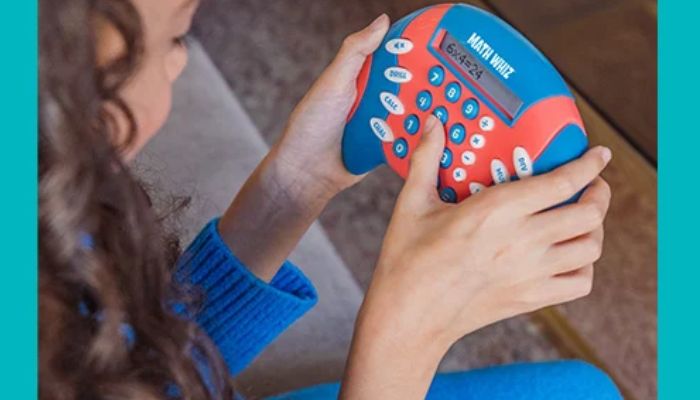
Math Whiz is a handheld maths game that practises addition, subtraction, multiplication and division. It has an LCD screen and three modes: Drill, Challenge and Calculator. Educational Insights aims at children around ages 6 to 8.
Key features and specs
- Skills: Addition, subtraction, multiplication and division
- Modes: Drill (a rising sequence of problems), Challenge (a number elimination game) and Calculator
- Levels: Eight difficulty levels for each skill in Drill mode
- Display: LCD screen
- Power: 2 AAA batteries, not included
- Portability: Compact, for use at home, in class or on journeys
- Age: Described for kids aged 6 to 8
Performance
Drill mode allows for the advancement through the levels according to the pace of the child, which works well for individual learning. Challenge mode converts these same math problems into a game, making them more fun and less tedious. Calculator mode is a good addition to the programme but replaces the game.
Pros
- Eight difficulty levels per skill in Drill mode
- Three modes keep practice varied.
- Small enough for car journeys and waiting rooms
Cons
- Batteries are not included.
- The listing says it cannot be shipped to some delivery locations.
- No dimensions, weight or warranty are given.
Today's best deals
Educational insights for math whizzes — View at Amazon
4. Super decoder code-breaking puzzle
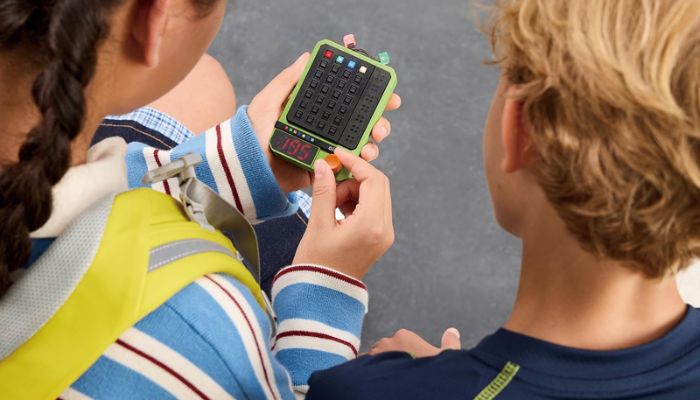
This handheld puzzle asks players to crack a four-colour secret code in seven moves or fewer. It has 600 levels, split into 100 easy and 500 advanced, and works solo or for two players. A mute mode keeps it quiet.
Key features and specs
- Task: Identify a four-colour code in 7 moves or fewer
- Levels: 600, made up of 100 easy and 500 advanced
- Players: One or two, with a duo mode where one player sets the code
- Hints: Direct or indirect, depending on the player
- Controls: Twist and press to enter each guess
- Power: 2 AA batteries, not included in the listing
- Age: 5 and up (per the listing)
- Extras: Mute mode
- Safety note: Small parts, not suitable for children under 3
Performance
Code breaking involves a test run, interpretation of the clues, and adjustments, which is basically the crux of deductive reasoning. The two types of clues give an easier time to the young while giving little to the older. Playing in pairs incorporates an element of social interaction, where each player designs a code for the other to crack.
Pros
- 600 levels give plenty of progression.
- Choice of hint style
- Solo and two-player modes
Cons
- Most of the challenge is in Advanced Mode.
- Batteries are not clearly included.
- The listing gives no size or weight
Today's best deals
GiiKER super decoder code-breaking puzzle — View at Amazon
5. Bilingual junior book Learning Laptop
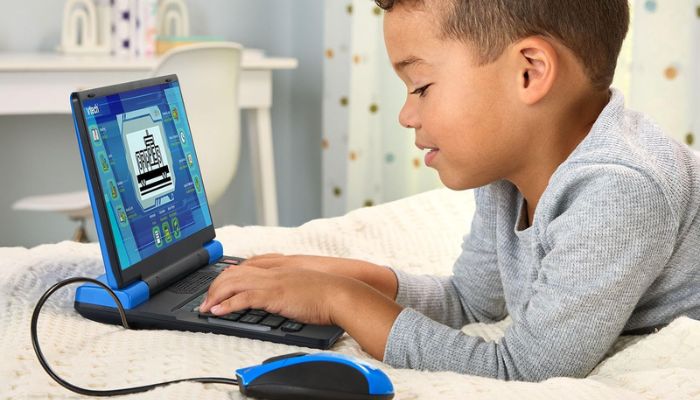
This is a child's first laptop with a full-size QWERTY keyboard and a cursor controller that works for right- or left-handed users. It has over 80 pre-loaded activities in English and Spanish and needs no internet connection. VTech recommends it for ages 5 and up.
Key features and specs
- Activities: Over 80, including a weekly calendar, notebook, music player and games
- Subjects: Maths, science, language arts, music and Spanish
- Vocabulary: More than 200 words (per the description)
- Languages: Every activity in English or Spanish
- Keyboard: Full-size QWERTY, with a right- or left-hand cursor controller
- Connectivity: None needed, as all activities are pre-loaded
- Power: 4 AA batteries, included for demo purposes only
- Age: 5 and up
Performance
An authentic keyboard will allow the child to memorise the location of the letters before using a laptop. Alternating all activities from one language to another language will make it easy to adopt the second language. This programme can be used without any internet connection, making it ideal for car rides.
Pros
- Full-size QWERTY keyboard for early computer skills
- Every activity in English and Spanish
- Works without an internet connection
Cons
- The included batteries are for demo only, so you will need new ones
- It needs 4 AA batteries.
- The listing gives no size, weight or warranty.
Today's best deals
VTech Genio bilingual junior book learning laptop for kids — View at Amazon