Jan 05, 2026
WhatsApp is reportedly developing a new disappearing message timer feature for its web version, providing users more ability to control over how long messages remain visible.
WABetaInfo reported that the WhatsApp update aims to enhance privacy and bring 'WhatsApp Web' experience in line with features already launched on mobile platforms; however, the feature is still under development and is not yet available to beta users, but early signs indicate an expansion beyond the present, longer disappearing messages timer options.
How does disappearing messages work on WhatsApp?
Users can choose to enable disappearing messages for all chats or select specific chats. In individual chats, either you or the person you’re messaging can enable disappearing messages on or off.
Anyone can turn disappearing messages on or off in group chats by default. But, group admins can change group settings to allow only admins to do this. Learn how to turn disappearing messages on or off in a group in this help article.
- You can set disappearing messages as the default for new individual chats by
- Going to 'Settings', then 'Privacy'
- You will find 'Default message timer' option.
- Tap on that and choose a duration. You can set messages to disappear after 24 hours, 7 days, or 90 days.
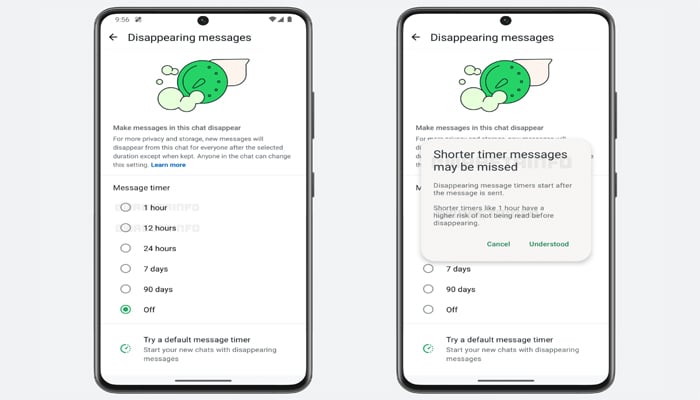
The new disappearing messages timers on WhatsApp Web are likely to include one-hour and twelve-hour settings, allowing messages to vanish much sooner after being sent.
These options would be particularly helpful for sharing temporary access details, one-time codes, short instructions, or same-day plans, eliminating the need for users to manually delete messages.